Hi team ,
I know how to request user defined identifiers in API -using the below article.. but can you please help how to label it using API
@vinaya.shetty
Thank you for reaching out to us.
Please clarify your question.
What do you mean by labeling it?
Typically, you can specify the values in the "InstrumentIdentifiers".
"InstrumentIdentifiers": [

                {

                    "Identifier": "IBM.N",

                    "IdentifierType": "Ric",
      "UserDefinedIdentifier": "MyIBMId",

                    "UserDefinedIdentifier2": "MySecondIBMId"

                },

                {

                    "Identifier": "KO.N",

                    "IdentifierType": "Ric",
     "UserDefinedIdentifier": "MyCocaColaId"

                }

            ],
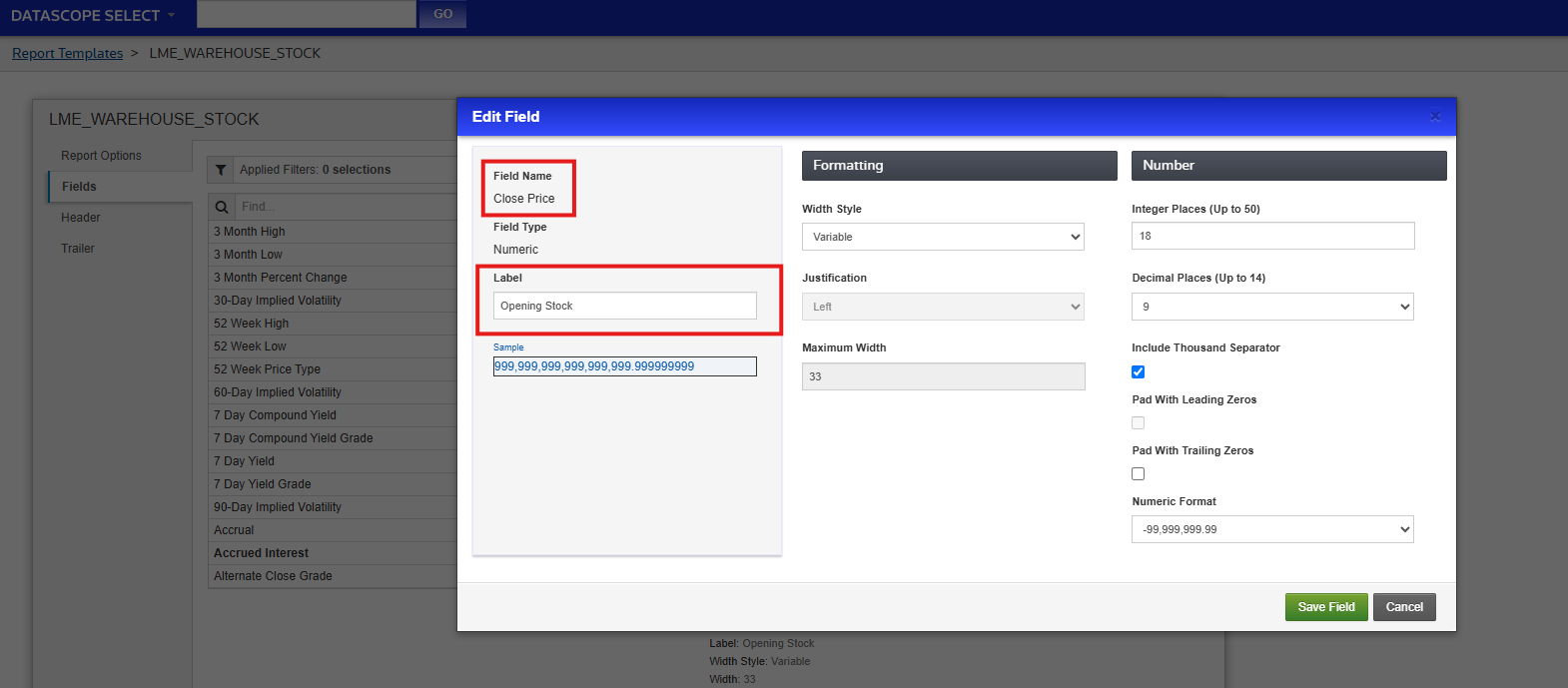
Hi @Jirapongse on Datascope UI when we create a report template.. we do get an option to format a field and Label it .. example in screenshot below.. how can I achieve this using REST API..
any help appreciated
@VSdev
You can use the DSS REST API to create a report template that supports the label and formatting.
However, on-demand extraction requests don't support the label and field's formatting.
Hi @Jirapongse thanks for the help.. can you kindly share an example script of a report template which as label and formatting.. so that i can try at my end
For example, I created the EndOfDayPricingReportTemplates with the following endpoint.
POST https://selectapi.datascope.refinitiv.com/RestApi/v1/Extractions/EndOfDayPricingReportTemplates
The request message looks like this:
{

  "@odata.type": "#DataScope.Select.Api.Extractions.ReportTemplates.EndOfDayPricingReportTemplate",

  "ShowColumnHeaders": false,

  "Name": "EODTemplateWithFormat",

  "Headers": [],

  "Trailers": [],

  "ContentFields": [

    {

      "FieldName": "Instrument ID"

    },

    {

      "FieldName": "Security Description"

    },

    {

      "FieldName": "Universal Close Price Date"

    },
 {

      "FieldName": "Universal Close Price",

      "Label":"Close Price",

      "Format":{

        "@odata.type": "#DataScope.Select.Api.Extractions.ReportTemplates.ContentFieldNumberFormat",

        "DecimalPlaces": 9,

        "DecimalSeparator": "Period",

        "IntegerPlaces": 18,

        "UseLeadingZero": false,

        "NegativeSignPosition": "Before",

        "ThousandSeparator": "Comma",

        "UseThousandSeparator": true,

        "UseTrailingZero": false

      }

    }

  ],

  "Condition": null

}
For other parameters, please refer to the API Reference Tree.