Sample workspace excel formula. Client as access for the RIC AAPL.O
=@RDP .Data("AAPL.O","TR.NetDebtToEBITDA;TR.NetDebtEV","CH=Fd RH=IN")
@Uday_PK
Thank you for reaching out to us.
The Python code with the LSEG Data Library for Python looks like this:
df = ld.get_data(
    universe = ["AAPL.O"],
    fields = ["TR.NetDebtToEBITDA",
              "TR.NetDebtEV"])
df
The sample code is available on GitHub.
Hi @Uday_PK ,
The code below can be used
import lseg.data as ld


ld.open_session()


ld.get_data(

    universe=['AAPL.O'],

    fields=['TR.NetDebtToEBITDA','TR.NetDebtEV']

)
As the Eikon Data API (EDAPI) is considered feature-complete and remains compatible with the LSEG Workspace application, its support and maintenance were discontinued. Therefore, we encourage users to upgrade to our next-generation Data Library for Python as part of the LSEG Workspace migration.
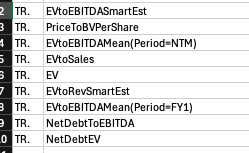
Client: Thank you for your prompt response. Afraid that I was not able to retrieve data using {‘CH’:’Fd’, ‘RH’:’IN'} as a python API call parameter. The data for these two fields is however now available this morning using my original code. Please find a complete list of missing data fields that I encountered on Saturday and Sunday am in the attached screen shot. All these fields are now working again this morning. I would be grateful if you reported the list of fields to your IT team. I had the same problem with these fields around 3-4 weekends ago i.e. missing data on Saturday am that is then resolved by Sun or Monday am. My investment process workflow is structured around this data being available on Saturday am. So, I would appreciate your systems team looking into this issue.
According to the description, it looks like to be a content question.
The client found this issue on Saturday and Sunday and it worked fine on Monday with the same code.
Please contact the content team to verify the data of those fields on Saturday and Sunday.